Call Us At 604-399-8066

AWS vs Azure vs GCP A Practical Comparison of the Top Cloud Providers
Choosing the right cloud provider can significantly impact the success of your project, business, or career.
Today, three major platforms dominate the cloud computing landscape:
- Amazon Web Services (AWS)
- Microsoft Azure
- Google Cloud Platform (GCP)
Each platform offers powerful capabilities, but they differ in strengths, integrations, pricing models, and ideal use cases.
In this article, we’ll break down the core features of each provider and compare them in a simple, practical way so you can make an informed decision.
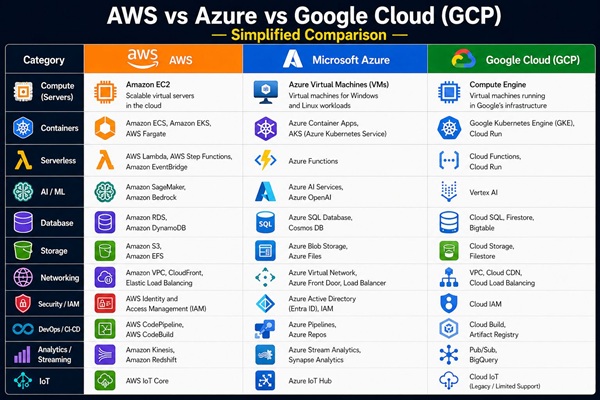
Amazon Web Services (AWS) – The Pioneer and Industry Leader
Amazon Web Services (AWS) is the oldest and most widely adopted cloud platform in the world.
It offers the largest collection of cloud services and supports businesses of all sizes—from startups to global enterprises.
If cloud computing were a city, AWS would be the largest one with the most tools and infrastructure available.
Key AWS Services and Capabilities
AWS provides hundreds of services across multiple categories:
Compute Services
These services allow you to run applications and workloads.
- EC2 (Elastic Compute Cloud) – Virtual servers in the cloud
Runs scalable virtual servers in the cloud where you can deploy applications and services.
- AWS Lambda – Serverless computing (run code without managing servers)
Executes code automatically without requiring server management (serverless computing).
- Elastic Beanstalk – Easy application deployment platform
Deploys and manages applications automatically without handling infrastructure setup.
- Auto Scaling – Automatically adjusts resources based on demand
Automatically increases or decreases resources based on traffic and workload demand.
Storage Services
Reliable and scalable data storage solutions.
- S3 (Simple Storage Service) – Object storage for files and backups
Stores and retrieves files, backups, and media with high durability and scalability.
- EBS (Elastic Block Storage) – Storage for virtual machines
Provides persistent disk storage attached to virtual machines.
- Glacier – Low-cost archival storage
Offers low-cost long-term storage for archives and infrequently accessed data.
Database Services
- RDS (Relational Database Service) – Managed SQL databases
Runs managed SQL databases such as MySQL, PostgreSQL, and SQL Server.
- DynamoDB – NoSQL database
Delivers fast and scalable NoSQL database services for high-performance applications.
- Aurora – High-performance cloud database
Provides a high-performance relational database compatible with MySQL and PostgreSQL.
Networking & Security
- VPC (Virtual Private Cloud)
Creates a private and isolated network environment inside AWS.
- CloudFront (Content Delivery Network)
Delivers content globally with low latency using a Content Delivery Network (CDN).
- Route 53 (DNS management)
Manages domain names and routes users to the correct application endpoints.
- IAM (Identity and Access Management)
Controls user permissions and access to AWS resources securely.
Advantages of AWS
Largest ecosystem of services
Massive global infrastructure
Strong community and documentation
Suitable for almost any workload
Potential Challenges
Can be complex for beginners
Cost management requires careful planning
Best Use Cases for AWS
- Startups and growing companies
- Scalable web applications
- SaaS platforms
- General-purpose cloud workloads
Microsoft Azure – The Enterprise Favorite
Microsoft Azure is one of the most popular cloud platforms, especially in corporate and enterprise environments.
Azure integrates deeply with Microsoft products such as Windows Server, Active Directory, and .NET applications.
For organizations already using Microsoft technologies, Azure is often the natural choice.
Key Azure Services and Capabilities
Compute Services
- Azure Virtual Machines – Windows and Linux servers
Provides scalable Windows and Linux virtual servers in the cloud.
- Azure App Services – Managed web applications
Hosts web apps, APIs, and mobile backends without managing infrastructure.
- Azure Functions – Serverless computing
Runs event-driven code automatically without maintaining servers.
Storage Services
- Blob Storage – Object storage
Stores large amounts of unstructured data such as images and videos.
- Azure Disk Storage
Provides high-performance disks for virtual machines.
- Azure File Storage
Offers cloud-based file shares accessible from multiple systems.
Database Services
- Azure SQL Database
Provides a fully managed relational SQL database service.
- Cosmos DB – Globally distributed NoSQL database
Offers globally distributed NoSQL databases with low latency worldwide.
- Managed MySQL and PostgreSQL
Runs managed open-source databases with automatic maintenance.
AI and Analytics Services
- Azure AI Services
Provides pre-built AI models for vision, speech, language, and decision-making.
- Azure Machine Learning
Builds, trains, and deploys machine learning models at scale.
- Azure Synapse Analytics
Analyzes large datasets using integrated data warehousing and analytics tools.
Advantages of Azure
Excellent integration with Microsoft tools
Strong hybrid cloud capabilities
Popular among large organizations
Enterprise-grade security features
Potential Challenges
Some services may be more expensive
Interface can feel complex at times
Best Use Cases for Azure
- Enterprise-level applications
- Hybrid cloud environments
- Microsoft-based infrastructures
- Corporate IT systems
Google Cloud Platform (GCP) – The Data and AI Specialist
Google Cloud Platform (GCP) is known for its strength in data analytics, machine learning, and containerized workloads.
Google’s deep expertise in infrastructure, data processing, and AI technologies makes GCP especially attractive for modern applications.
Key GCP Services and Capabilities
Compute Services
- Compute Engine – Virtual machines
Runs customizable virtual machines in Google Cloud. - App Engine – Platform-as-a-Service (PaaS)
Deploys applications without managing servers or infrastructure. - Cloud Functions – Serverless computing
Executes lightweight code triggered by events in a serverless environment.
Containers & Kubernetes
- Google Kubernetes Engine (GKE)
Widely considered one of the best managed Kubernetes platforms available.
Runs and manages containerized applications using Kubernetes.
Cloud Run
Deploys containerized applications automatically without managing infrastructure.
Data & Analytics Services
- BigQuery – Serverless data warehouse
Analyzes massive datasets quickly using a serverless data warehouse. - Dataflow – Stream and batch processing
Processes large volumes of streaming and batch data. - Pub/Sub – Messaging service
Transfers messages between services in real time.
Machine Learning & AI
- Vertex AI
Builds, trains, and deploys machine learning models in one unified platform. - AutoML
Creates custom machine learning models without deep coding knowledge. - TensorFlow Integration
Supports Google’s popular machine learning framework directly in the cloud.
Advantages of GCP
Powerful data analytics tools
Strong machine learning ecosystem
Excellent Kubernetes support
Competitive pricing in many scenarios
Potential Challenges
Smaller service ecosystem than AWS
Smaller community compared to AWS
Best Use Cases for GCP
- Data-driven applications
- AI and machine learning projects
- Kubernetes-based systems
- Cloud-native architectures
AWS vs Azure vs GCP – Side-by-Side Comparison
| Feature | AWS | Azure | GCP |
|---|---|---|---|
| Market Share | ⭐⭐⭐⭐⭐ | ⭐⭐⭐⭐ | ⭐⭐⭐ |
| Service Variety | ⭐⭐⭐⭐⭐ | ⭐⭐⭐⭐ | ⭐⭐⭐⭐ |
| Enterprise Support | ⭐⭐⭐⭐ | ⭐⭐⭐⭐⭐ | ⭐⭐⭐ |
| AI & Data Tools | ⭐⭐⭐⭐ | ⭐⭐⭐⭐ | ⭐⭐⭐⭐⭐ |
| Kubernetes Support | ⭐⭐⭐⭐ | ⭐⭐⭐⭐ | ⭐⭐⭐⭐⭐ |
| Beginner Friendliness | ⭐⭐⭐ | ⭐⭐⭐ | ⭐⭐⭐⭐ |
Pricing Overview
Pricing across cloud providers depends heavily on usage, region, and architecture.
However, in general:
- AWS – Flexible but requires careful cost monitoring
- Azure – Cost-effective for organizations using Microsoft licenses
- GCP – Often competitive for compute and analytics workloads
Important Note:
Cost optimization is as important as choosing the right provider.
Which Cloud Provider Should You Choose?
Here’s a practical guide:
If you’re just getting started with cloud:
AWS is a safe and flexible choice.
If your organization relies on Microsoft tools:
Azure is usually the best fit.
If you’re working with data, AI, or containers:
GCP is an excellent option.
Quick Summary
If we summarize the strengths of each platform:
- AWS → General-purpose & Scalability
- Azure → Enterprise & Microsoft Ecosystems
- GCP → Data, AI & Modern Cloud-Native Systems
All three platforms are industry leaders.
The “right” choice depends on your technical requirements, team expertise, and long-term goals.
Final Thoughts
Cloud computing is no longer optional-it’s essential for modern applications and businesses.
Understanding the differences between AWS, Azure, and GCP helps you:
- Build scalable systems
- Optimize infrastructure costs
- Improve deployment speed
- Advance your technical career
The best cloud provider is not the one with the most features, it’s the one that best matches your project requirements and technology stack.
Recent Blogs
- The Future of Backup Infrastructure: AI, Autonomous Recovery, and the Evolution of Cyber Resilience

- The Future of Networking: How Automation and AI Are Transforming Modern Infrastructure

- How Cisco AI-RRM Automatically Optimizes Wi-Fi Networks (Complete Guide)
- AWS vs Azure vs GCP – A Practical Comparison of the Top Cloud Providers



FAQ:
Q1: Which cloud provider is best: AWS, Azure, or GCP?
A1: There is no single “best” cloud provider for every situation.
AWS is known for its wide range of services and flexibility, Azure is ideal for enterprise environments and Microsoft-based systems, and GCP is strong in data analytics, machine learning, and container-based applications. The best choice depends on your project requirements and technology stack.
Q2: Is AWS harder to learn than Azure or GCP?
A2: AWS can feel more complex at the beginning because it offers a very large number of services. However, it also has extensive documentation and learning resources, which makes it easier to find help compared to other platforms.
Q3: Which cloud platform is best for beginners?
A3: AWS is often recommended for beginners due to its popularity and learning resources. However, GCP is also considered beginner-friendly because of its simpler interface and clear service structure.
Q4: Is Azure better than AWS for enterprise environments?
A4: In many cases, yes. Azure integrates deeply with Microsoft tools such as Windows Server, Active Directory, and .NET applications, making it a strong choice for enterprise organizations already using Microsoft technologies.
Q5: Which cloud provider is best for machine learning and AI?
A5: GCP is widely recognized for its powerful machine learning and data analytics tools, such as BigQuery and Vertex AI.
However, AWS and Azure also offer strong AI services suitable for enterprise and production workloads.
Q6: Can I use multiple cloud providers at the same time?
A6: Yes. Many organizations adopt a multi-cloud strategy, using services from more than one provider to improve flexibility, reliability, and vendor independence.
Q7: Which cloud provider is the cheapest?
A7: There is no universal cheapest provider. Pricing depends on usage, region, architecture, and resource type.
GCP is often competitive for compute workloads, while Azure can be cost-effective for organizations already using Microsoft licenses, and AWS offers flexible pricing models.
Q8: Are AWS, Azure, and GCP secure?
A8: Yes. All three providers offer enterprise-grade security features, including encryption, identity management, network security, and compliance certifications. However, proper configuration and security practices are still essential.
Let’s Build Your Future Together
Take the Next Step Today
and Explore How Northinex Can Elevate Your IT
with Cutting-Edge Technology Tailored for Your Business